

































































Which Sharp devices support eSIM?
19 of 25 Sharp models in our list support eSIM. Check the notes: some versions depend on the country where they were sold.

Where to find eSIM on Sharp
Settings → Network & internet → SIMs → Add SIM. If you see Set up an eSIM, your phone supports it.
Or dial *#06#: if you see an EID number, the device has eSIM. Bought from a carrier? It must be unlocked before a travel eSIM works.
All Sharp models
 SharpAQUOS wish6Details
How to check
Settings → Network & internet → SIMs → Add SIM. If you see Set up an eSIM, your phone supports it.
Or dial *#06#: if you see an EID number, the device has eSIM.
Bought from a carrier? It must be unlocked before a travel eSIM works.
Image: © Sharp
- SharpAQUOS sense10Details
How to check
Settings → Network & internet → SIMs → Add SIM. If you see Set up an eSIM, your phone supports it.
Or dial *#06#: if you see an EID number, the device has eSIM.
Bought from a carrier? It must be unlocked before a travel eSIM works.
Image: © Sharp
- SharpAQUOS R10Details
How to check
Settings → Network & internet → SIMs → Add SIM. If you see Set up an eSIM, your phone supports it.
Or dial *#06#: if you see an EID number, the device has eSIM.
Bought from a carrier? It must be unlocked before a travel eSIM works.
Image: © Sharp
- SharpAQUOS wish5Details
How to check
Settings → Network & internet → SIMs → Add SIM. If you see Set up an eSIM, your phone supports it.
Or dial *#06#: if you see an EID number, the device has eSIM.
Bought from a carrier? It must be unlocked before a travel eSIM works.
Image: © Sharp
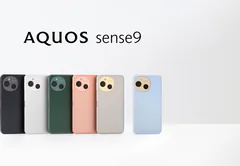
- SharpAQUOS sense9Details
How to check
Settings → Network & internet → SIMs → Add SIM. If you see Set up an eSIM, your phone supports it.
Or dial *#06#: if you see an EID number, the device has eSIM.
Bought from a carrier? It must be unlocked before a travel eSIM works.
Image: © Sharp
- SharpAQUOS R9Details
How to check
Settings → Network & internet → SIMs → Add SIM. If you see Set up an eSIM, your phone supports it.
Or dial *#06#: if you see an EID number, the device has eSIM.
Bought from a carrier? It must be unlocked before a travel eSIM works.
Image: © Sharp
- SharpAQUOS R9 proDetails
How to check
Settings → Network & internet → SIMs → Add SIM. If you see Set up an eSIM, your phone supports it.
Or dial *#06#: if you see an EID number, the device has eSIM.
Bought from a carrier? It must be unlocked before a travel eSIM works.
Image: © Sharp
- SharpAQUOS wish4Details
How to check
Settings → Network & internet → SIMs → Add SIM. If you see Set up an eSIM, your phone supports it.
Or dial *#06#: if you see an EID number, the device has eSIM.
Bought from a carrier? It must be unlocked before a travel eSIM works.
Image: © Sharp
- SharpAQUOS sense8Details
How to check
Settings → Network & internet → SIMs → Add SIM. If you see Set up an eSIM, your phone supports it.
Or dial *#06#: if you see an EID number, the device has eSIM.
Bought from a carrier? It must be unlocked before a travel eSIM works.
Image: © Sharp
- SharpAQUOS R8Details
How to check
Settings → Network & internet → SIMs → Add SIM. If you see Set up an eSIM, your phone supports it.
Or dial *#06#: if you see an EID number, the device has eSIM.
Bought from a carrier? It must be unlocked before a travel eSIM works.
Image: © Sharp
- SharpAQUOS R8 proDetails
How to check
Settings → Network & internet → SIMs → Add SIM. If you see Set up an eSIM, your phone supports it.
Or dial *#06#: if you see an EID number, the device has eSIM.
Bought from a carrier? It must be unlocked before a travel eSIM works.
Image: © Sharp
- SharpAQUOS wish3Details
How to check
Settings → Network & internet → SIMs → Add SIM. If you see Set up an eSIM, your phone supports it.
Or dial *#06#: if you see an EID number, the device has eSIM.
Bought from a carrier? It must be unlocked before a travel eSIM works.
Image: © Sharp
- SharpAQUOS sense6sDetails
How to check
Settings → Network & internet → SIMs → Add SIM. If you see Set up an eSIM, your phone supports it.
Or dial *#06#: if you see an EID number, the device has eSIM.
Bought from a carrier? It must be unlocked before a travel eSIM works.
Image: © Sharp
- SharpAQUOS sense7Details
How to check
Settings → Network & internet → SIMs → Add SIM. If you see Set up an eSIM, your phone supports it.
Or dial *#06#: if you see an EID number, the device has eSIM.
Bought from a carrier? It must be unlocked before a travel eSIM works.
Image: © Sharp
- SharpAQUOS sense7 plusDetails
How to check
Settings → Network & internet → SIMs → Add SIM. If you see Set up an eSIM, your phone supports it.
Or dial *#06#: if you see an EID number, the device has eSIM.
Bought from a carrier? It must be unlocked before a travel eSIM works.
Image: © Sharp
- SharpAQUOS R7Details
How to check
Settings → Network & internet → SIMs → Add SIM. If you see Set up an eSIM, your phone supports it.
Or dial *#06#: if you see an EID number, the device has eSIM.
Bought from a carrier? It must be unlocked before a travel eSIM works.
Image: © Sharp
- SharpAQUOS wishDetails
How to check
Settings → Network & internet → SIMs → Add SIM. If you see Set up an eSIM, your phone supports it.
Or dial *#06#: if you see an EID number, the device has eSIM.
Bought from a carrier? It must be unlocked before a travel eSIM works.
Image: © Sharp
- SharpAQUOS wish2eSIM depends on the country and model number.Details
- eSIM depends on the country and model number.
- Versions sold in Japan have no eSIM.
How to check
Settings → Network & internet → SIMs → Add SIM. If you see Set up an eSIM, your phone supports it.
Or dial *#06#: if you see an EID number, the device has eSIM.
Bought from a carrier? It must be unlocked before a travel eSIM works.
Image: © Sharp
- SharpAQUOS sense5GDetails
This model has no eSIM. You can share the internet from a phone that has one.
Image: © Sharp
- SharpAQUOS sense6eSIM depends on the country and model number.Details
- eSIM depends on the country and model number.
- Versions sold in Japan have no eSIM.
How to check
Settings → Network & internet → SIMs → Add SIM. If you see Set up an eSIM, your phone supports it.
Or dial *#06#: if you see an EID number, the device has eSIM.
Bought from a carrier? It must be unlocked before a travel eSIM works.
Image: © Sharp
- SharpAQUOS R6Details
This model has no eSIM. You can share the internet from a phone that has one.
Image: © Sharp
- SharpAQUOS zero6Details
How to check
Settings → Network & internet → SIMs → Add SIM. If you see Set up an eSIM, your phone supports it.
Or dial *#06#: if you see an EID number, the device has eSIM.
Bought from a carrier? It must be unlocked before a travel eSIM works.
Image: © Sharp
- SharpAQUOS sense4Details
This model has no eSIM. You can share the internet from a phone that has one.
Image: © Sharp
- SharpAQUOS sense4 liteDetails
How to check
Settings → Network & internet → SIMs → Add SIM. If you see Set up an eSIM, your phone supports it.
Or dial *#06#: if you see an EID number, the device has eSIM.
Bought from a carrier? It must be unlocked before a travel eSIM works.
Image: © Sharp
- SharpAQUOS sense4 plusDetails
This model has no eSIM. You can share the internet from a phone that has one.
Image: © Sharp
Sharp eSIM questions
Which Sharp models support eSIM?
How do I check if my Sharp device has eSIM?
Does it depend on where I bought my Sharp device?
Does my Sharp device need to be unlocked?
Can I keep my own SIM while using a travel eSIM?
Sources
Checked against the manufacturer's own pages on 15 November 2026. Device lists change with every release and vary by country.